Filter by

Friday, September 24, 2010

Day 47 - Still having unstable ping results

Usage Time:
7:40am to 7:50am - Worst
7:50am to 8:12am - Acceptable
6:30pm to 12:30am - Bad

Browsing Experience:
7:40am to 7:50am - Good signal and stable but I get many request timed out when I ping my default gateway and google.com

7:50am to 8:12am - Now my ping is responding and I can browse website but download speed are limited to less than 70kBps and sometimes reaching 140kBps.

6:30pm to 12:00pm - Signal is good and stable, ping on my default gateway is reponding with some random request timed out but my ping on google.com is having many request timed out. I have added my ping results so you can see what my ping looks like on the bottom of this post. When I browse websites, the page loads so slow when it contains images because my download speed is fluctuating.

This is taken when my ping is continuous.
Time 8:00pm: Browsing Starcraft 2.
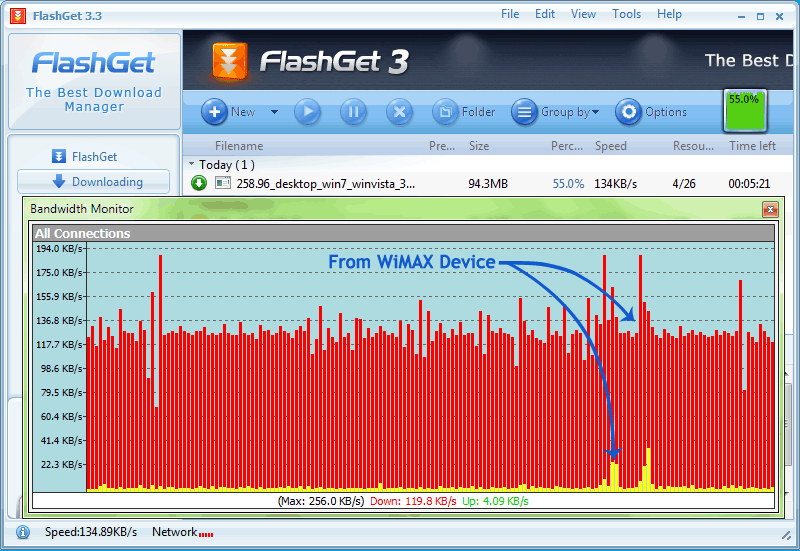
Time: 8:00pm - Downloading file using flashget.
Good old times.  = (
Base Station ID = 0x00006503b729
Download speed = slow
Ping Status = Many Request timed out
Weather = Fair

Time
Signal
RSSI
CINR
Temp.
IP Address
Lease Obtained
7:40am
2
-84
7 to 8
39
10.0.118.60
Sep 24 07:19:29 2010
9:18pm
2
-84
8
49
10.0.118.60
Sep 24 17:34:02 2010
Time: 8:07am
Ping statistics for google.com(72.14.254.104):
Packets: Sent = 1202, Received = 1162, Lost = 40 (3% loss),
Approximate round trip times in milli-seconds:
Minimum = 244ms, Maximum = 3403ms, Average = 803ms
Time: 8:07am
Ping statistics for Default Gateway(10.0.0.1):
Packets: Sent = 1076, Received = 1033, Lost = 43 (3% loss),
Approximate round trip times in milli-seconds:
Minimum = 46ms, Maximum = 3363ms, Average = 601ms


Thursday, September 23, 2010

Day 46 - Super Duper Heavy Request timed out!

Usage Time:
6:10pm to 10:00pm - Worst

Browsing Experience:
6:10pm to 9:10pm - Most of the time I get Super duper heavy request timed out! My signal is good. I also tried adjusting my device location but signal is really not my problem.
9:18pm - I reboot my device and still got 2 bars signal.
9:20pm - I started pinging 10.0.0.1 then after 6 minutes I got disconnected.
9:28pm - I got connected and ping is now responding but with 1 to 6 request timed out and then followed by 1000+ms latency.
9:56pm - I stopped pinging and monitoring then I sleep.

Base Station ID = 0x00006503b729
Download speed = none
Ping Status = Heavy Request timed out
Weather = Cloudy

Time
Signal
RSSI
CINR
Temp.
IP Address
Lease Obtained
6:10pm
2
-84
7
44
10.0.246.177
Sep 23 17:53:05 2010
7:18pm
2
-83
7
50
10.0.246.177
Sep 23 17:53:05 2010
9:06pm
2
-84
8
50
10.0.246.177
Sep 23 20:11:29 2010
Time: Around 9:00 to 11:45pm
Ping statistics for google.com(72.14.254.104):
Packets: Sent = 1165, Received = 497, Lost = 668 (57% loss),
Approximate round trip times in milli-seconds:
Minimum = 73ms, Maximum = 3975ms, Average = 1042ms
Time: 9:20pm to 9:56pm
Ping statistics for Default Gateway(10.0.0.1):
Packets: Sent = 696, Received = 366, Lost = 330 (47% loss),
Approximate round trip times in milli-seconds:
Minimum = 43ms, Maximum = 3940ms, Average = 1008ms

Wednesday, September 22, 2010

Day 45 - Signal is good but I'm getting many Request timed out

Usage Time:
7:30pm to 12:00am- Worst
12:10am - Acceptable

Browsing Experience:
7:30pm – 12:00amI can't browse anything because I can't have good connection from my Default Gateway. I always get Request timed out problem when I Ping my Default Gateway(10.0.0.1). I don't have any problem on my WiMAX Device Signal because I haven't experience many request timed out from the first 40 days of using my SmartBRO WiMAX, it just started a day after I reported my case to Smart Communication Inc. on Facebook. I hope they are really doing something to my Base Station and they fix it ASAP.

12:10pm – 12:30pm Ping is now continuous and low with some 1000+ latency from time to time. I didn't reboot my device and I haven't got disconnected from my base station based on my Connection up time and Device up time. It is really frustrating because I need to sleep now.

Base Station ID = 0x00006503b729
Download speed = Fluctuating
Ping Status = Heavy Request timed out
Weather = Rainy

Time
Signal
RSSI
CINR
Temp.
IP Address
Lease Obtained
7:00pm
2
-81
8
46
10.0.246.177
Sep 21 17:39:49 2010
8:00pm
2
-83
6
46
10.0.246.177
Sep 21 17:39:49 2010
Time: 7:45pm
Ping statistics for Default Gateway(10.0.0.1):
Packets: Sent = 398, Received = 132, Lost = 266 (66% loss),
Approximate round trip times in milli-seconds:
Minimum = 55ms, Maximum = 3969ms, Average = 655ms
Time: Around 9:00 to 11:45pm
Ping statistics for google.com(64.233.181.104):
Packets: Sent = 5467, Received = 3819, Lost = 1648 (30% loss),
Approximate round trip times in milli-seconds:
Minimum = 30ms, Maximum = 3965ms, Average = 555ms
Time: Around 9:00 to 11:45pm
Ping statistics for google.com(64.233.181.104):
Packets: Sent = 5440, Received = 3792, Lost = 1648 (30% loss),
Approximate round trip times in milli-seconds:
Minimum = 65ms, Maximum = 3979ms, Average = 585ms
Time: Around 9:00 to 11:45pm
Ping statistics for my Device(192.168.15.1):
Packets: Sent = 11968, Received = 11839, Lost = 129 (1% loss),
Approximate round trip times in milli-seconds:
Minimum = 1ms, Maximum = 3480ms, Average = 5ms

Tuesday, September 21, 2010

Day 44 - Good to Acceptable Connection

Usage Time:
5:45pm - Good
7:10pm to 11:00 - Acceptable

Browsing Experience:
6:00pm – Good connection, no problem on my Trace Route results and ping is low and no request timed out.

7:00pm – 11:00pm Started having many request timed out from time to time. My signal is good, I haven’t got disconnected from my base station, I know it because my status on my device "WiMAX Connection Up Time" is the same with my "Device Up Time" and the time when I open my computer. From time to time I experiencing high latency and many Request Timed Out on my Ping. Once I get a low and continuous Ping I will use Trace Route to see if my connection to google is good. Based on my Trace Route results, I don't have many high latency or * which should be good but I still have delay when opening websites and sometimes I get "The connection has timed out". I also noticed that my Lease Obtained didn't change.

Base Station ID = 0x00006503b729
Download speed = Fluctuating
Ping Status = Fluctuating
Weather = Rainy

Time
Signal
RSSI
CINR
Temp.
IP Address
Lease Obtained
7:00pm
2
-81
8
46
10.0.246.177
Sep 21 17:39:49 2010
8:00pm
2
-83
6
46
10.0.246.177
Sep 21 17:39:49 2010

Monday, September 20, 2010

Day 43 - Big changes on trace route status

Usage Time:
5:45pm - Worst
7:10pm - Good
9:55pm - Acceptable
10:20pm - Worst
11:00pm - Acceptable

Browsing Experience:
I have reported and gave my website link to Smart Communication Inc. Facebook Account on Sunday, September 19  at 8:46pm. Smart Cares have sent me a private message on my Facebook today at 12:31pm saying:
Hello Mark. Thank you for visiting our page. We appreciate your feedback regarding our Wi Max service. Allow us to check your connection. Please PM us your Smart number, location, and contact number. Thank you.


5:45pm – Still the same as yesterday. Weak signal, many requeast timed out.

7:10pm – Ping is now back to normal, Trace route latency is very low. I tried browsing Starcraft 2 website and everything is loading fast and it is using all my bandwidth (125kBps) which is good. Starcraft website is full of graphics so this is a great website to test my download speed.

9:55pm – Started having some delay. I checked my trace route and see that there are some high latency again.

10:20pm – Started having high ping and many request timed out.

11:00pm – Ping started to get back to normal with some random high ping.

11:05pm – Ping is now normal. Websites are loading fast.

11:50pm – Random high ping again but websites are loading.

Base Station ID = 0x00006503b729
Download speed = Fluctuating
Ping Status = Fluctuating
Weather = Rainy

Time
Signal
RSSI
CINR
Temp.
IP Address
Lease Obtained
6:48pm
2
-82
9
46
10.0.246.177
Sep 20 18:03 2010
10:20pm
2
-80
10
47
10.0.246.177
Sep 20 18:03 2010
11:00pm
2
-80
10
46
10.0.246.177
Sep 20 18:03 2010
Time: Around 2:00pm to 5:30pm
Ping statistics for google.com(209.85.132.104):
Packets: Sent = 2824, Received = 2625, Lost = 199 (7% loss),
Approximate round trip times in milli-seconds:
Minimum = 63ms, Maximum = 3946ms, Average = 368ms
Time: 11:08pm
Ping statistics for google.com(72.14.254.104):
Packets: Sent = 9231, Received = 9004, Lost = 227 (2% loss),
Approximate round trip times in milli-seconds:
Minimum = 61ms, Maximum = 3276ms, Average = 140ms

Sunday, September 19, 2010

Day 42 - Started having Request timed out on ping even with good signal

Usage Time:
9:00am to 11:00am - No Problems
11:00am to 5:30pm - Worst
5:30pm to 12:00am - Bad

Browsing Experience:
9:00am – Everything is loading with minor delays.

11:00am to 11:30pm – Started having problems, WiMAX Disconnect Reason status are always SBC FAIL and REG FAIL, Many Request timed out. Signal is OK, 1 to 2 bars, -83dBm RSSI, and 6 to 7 dB CINR.

11:30am to 5:30pm – Restart my device, wait a minute until my device loads, check status of my signal and ping for a minute, when connected I will start browsing but after a minute or an hour I will get disconnected and start having many request timed out again. Sometimes I can't see my Base Station. This is what happened over and over. My Signal is stable to 2 bars.

5:30pm to 12:00am - After I restart my device. My Internet connection speed is now responding and I don't see many * on my Trace Route.

8:46pm - I gave my website address to  Smart Communication Inc.

Base Station ID = 0x00006503b729
Download speed = Fluctuating
Ping Status = Fluctuating
Weather = Fair

Time
Signal
RSSI
CINR
Temp.
IP Address
Lease Obtained
11:00am
1
-85
5
55
10.0.246.177
Jan 01 21:46 2007
11:16am
2
-83
7
55
10.0.246.177
Sep 19 10:57 2010
11:28am
2
-83
7
54
10.0.246.177
Sep 19 11:04 2010
Time: Around 2:00pm to 5:30pm
Ping statistics for google.com(209.85.132.104):
Packets: Sent = 2824, Received = 2625, Lost = 199 (7% loss),
Approximate round trip times in milli-seconds:
Minimum = 63ms, Maximum = 3946ms, Average = 368ms
Time: 11:08pm
Ping statistics for google.com(72.14.254.104):
Packets: Sent = 9231, Received = 9004, Lost = 227 (2% loss),
Approximate round trip times in milli-seconds:
Minimum = 61ms, Maximum = 3276ms, Average = 140ms

Saturday, September 18, 2010

Day 41 - Tried Scanning signal on the Roof

Usage Time:
2:48pm - No Problems
3:38pm to 7:32pm - Worst
9:50pm to 12:00pm - Acceptable

Browsing Experience:
2:48pm – No problems.

3:38pm – Slow connection, high Ping, many request timed out. Even with 2 bars signals and sometimes reaching 3 bars -77dBm 11dB.

3:55pm - I lost my signal after adjusting my device then I position it to where I always get a good signal but only one base station is showing. I can't get signal thru my base station so I restart my device.

3:58pm - After rebooting I can see my base station but I can't connect. I waited for 10 minutes but still can't connect to my base station. I restarted my device again.

4:15pm - I still can't connect and can't see my base station so I decided put my WiMAX device on the roof and see if I can get a good signal. After raising it on the roof, adjusting, scanning, checking, restarting, and monitoring my device for an hour. I got connected to 2 different Base Station ID but I can't see and connect to my main Base Station ID.
1. 0x0000650e5df3 = 1 bar Signal | -77dBm RSSI | 2 to 3dB CINR
2. 0x00006503b72b = 1 to 2 bars Signal | -72dBm RSSI | 5 to 6 dB CINR

5:50pm - I put it back to its original place. Check my device status, I can see my base station but I can't connect. As usual I restarted my device again and now I got connected to different Base Station. 0x00006503b72b with 1 bar Signal, -81dBm RSSI and 5dB CINR.

6:20pm - Restarted my device again and now I got 2 bars signal from my main base station but my Ping is high and got many Request Timed Out then after 3 minutes I lost my connection. I unplug my device and left it for an hour.

7:32pm - I plug my device, I can see my base station but I keep getting "BS SYNC LOSS" on WiMAX Disconnect Reason. I restart my device and now I got 2 bars signal. I Ping google.com and 10.0.0.1 but I get so many request timed out then I get "Destination net unreachable" it means that got disconnected again from their base station. I stop monitoring.

9:50pm - I check my device and now I have 2 bar signal and no more request timed out. When I browse the internet, Everything is loading but with a minor delay. Google map is now loading map images.

Base Station ID = 0x00006503b729, 0x0000650e5df3, 0x00006503b72b
Download speed = Fluctuating
Ping Status = Fluctuating
Weather = Fair

Time
Signal
RSSI
CINR
Temp.
IP Address
Lease Obtained
BS ID
2:48pm
2
-82
9
52
10.0.246.177
Sep 18 15:13 2010
0x00006503b729
3:38pm
2
-81
10
53
10.0.246.177
Sep 18 15:13 2010
0x00006503b729
5:26pm
1
-77
2 to 3
47
10.0.246.177
Jan 01 20:00 2007
0x0000650e5df3
5:36pm
2
-72
5 to 6
47
10.0.246.177
Jan 01 20:11 2007
0x00006503b72b
7:32pm
2
-82
8
50
10.0.246.177
Sep 18 19:15 2010
0x00006503b729
Time: 3:38pm
Ping statistics for google.com(72.14.254.104):
Packets: Sent = 4060, Received = 3497, Lost = 563 (13% loss),
Approximate round trip times in milli-seconds:
Minimum = 60ms, Maximum = 3881ms, Average = 245ms
Time: 3:38pm
Ping statistics for google.com(72.14.254.104):
Packets: Sent = 2320, Received = 2194, Lost = 126 (5% loss),
Approximate round trip times in milli-seconds:
Minimum = 44ms, Maximum = 3899ms, Average = 643ms
Time: 7:32pm
Ping statistics for google.com(72.14.254.104):
Packets: Sent = 124, Received = 35, Lost = 89 (71% loss),
Approximate round trip times in milli-seconds:
Minimum = 305ms, Maximum = 2292ms, Average = 1395ms
Time: 7:32pm
Ping statistics for 10.0.0.1:
Packets: Sent = 137, Received = 39, Lost = 98 (71% loss),
Approximate round trip times in milli-seconds:
Minimum = 72ms, Maximum = 3097ms, Average = 1377ms